Although I wish I could've done him in Substance Painter, here is where I've modeled and unwrapped my mini assets (ex. the clock, dynamite, and bomb) and applying a quick paint in ZBrush. Exported my Normal, AO, and Texture Paint Maps for texture application in Marmoset. These assets should round up to a good 3,000 quads; just enough to make my contract of retaining a 8K-12K polycount, but a lot needs to be done.
Artist name: Purple Ace! I excel through quality, hard-work ethic, originality, and multi-media: watercolor, figure drawings, concept art, character modeling, character animating, and motion graphics. Watch my work in progress! I'm growing to be a success.
Meet the Purple Ace!
Showing posts with label model. Show all posts
Friday, April 28, 2017
Friday, April 21, 2017
Indroducing Myself to Marvelous Designer
Hey! I FINALLY LEARNED MARVELOUS DESIGNER ON MY OWN! It took me quite awhile being that we was my first time, but I can now say I've gotten the hang of it. So what I done originally, was took some time to use MD's Boy Avatar to start off creating the collar-shirt (the collar was a huge pain) but I pulled through! I snapped some screenshots of my work in progress.
Labels:
3d,
animation,
art,
artist,
autodesk maya,
blending colors,
cartoonish game,
character,
character concept,
character design,
clothing,
concept,
design,
fashion designer,
model,
modeling,
tim burton,
zbrush
Location:
Stone Mountain, GA, USA
Wednesday, April 19, 2017
Rough Design Update
Here's another update on Clocksworth! Here I applied the basic color blinns to my retopology in Maya for a quick presentation update. All base models done in Maya, and the head, face, and arms are sculpted in ZBrush so far.
Based on my critique today, going to continue adding details and wrinkles in Zbrush to my other body meshes: for the Hat & Shoes. (Slightly adjust the nose a little). BUT, Thinking about using a new clothing program, Marvelous Designer to redo the clothing for a more realistic, edgy appeal. We'll see how this goes lol, wish me luck!
Labels:
3d,
autodesk maya,
character concept,
character design,
concept,
marmoset,
material lighting,
maya,
model,
modeling,
sculpting,
sculpture,
zbrush
Saturday, April 15, 2017
Retopology & Quick Colors
Hey! Just started Quad Drawing up my clothing! Cute results yes, but I think I want to try the cape in Marvelous Designer (if I can make the extra time). Final poly count is to be from 8,000-12,000 polys. Wish me luck!
Wednesday, April 12, 2017
Creating my Base Mesh & Simple Anatomy
I grabbed a stylized base mesh online, and altered the mesh accordingly. Adding details and constructing the face based off the reference given. [ALOT OF CHANGES MADE] I think I'm going to name this character "Clocksworth!" (Yeah lol, that'll fit.)
Dessimated, and reimported into Maya to retranslate the mesh to begin retopology.
Subscribe to:
Posts (Atom)
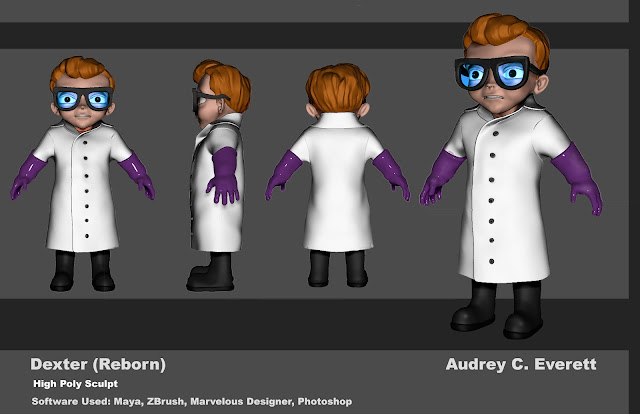
Dexter Final Update! ZBrush model by Audrey C. Everett
Concept by yours truly, Audrey C. Everett 1. Made some adjustments to his boots and cleanup his anatomy on his pinky. 2. Using th...
-
I've come to realize, I haven't posted any progress of my model of "Dexter" (as a real boy) from Cartoon Network's Dex...
-
This is a reference sheet of different planes and air-crafted textures, etc pertaining to how I want my aircraft to head towards. The back s...